IW7 Registration Problems: Common Issues and Possible Solutions
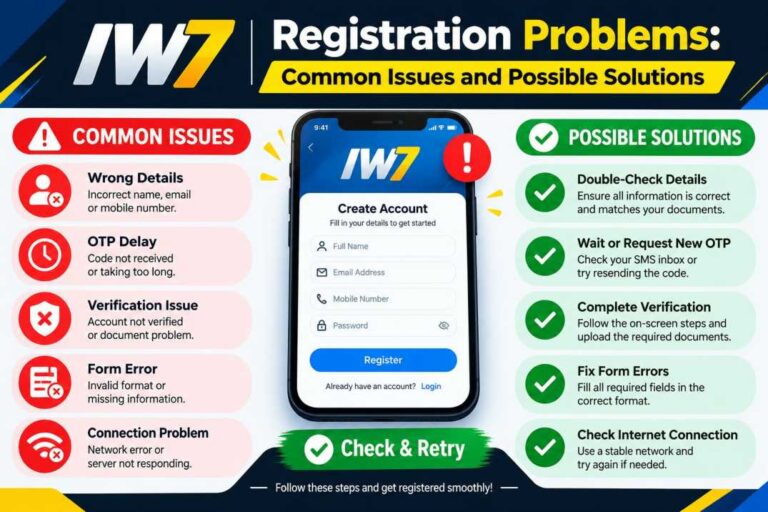
Registering for the IW7 app should normally be a straightforward process, but users can sometimes face problems while creating a new account. Registration errors may happen because of an incorrect mobile number, weak internet connection, verification delays, browser or app issues, or outdated application files. Understanding these common problems can help users troubleshoot them without repeatedly attempting the same steps.
The IW7 registration process usually requires users to enter accurate account information and complete a verification step before accessing the available features. If something goes wrong, it is better to identify the exact problem first and then apply a suitable solution. This guide covers 13 common IW7 registration problems and practical ways to resolve them.
Incorrect Mobile Number or Account Details
One of the simplest registration problems occurs when users enter incorrect information. A single missing digit or typing mistake can prevent the registration request from being processed correctly.
Before submitting the IW7 registration form, carefully check every field. Make sure the mobile number, username, password, and other required information are entered correctly.
Possible solutions:
- Recheck the mobile number before submitting.
- Make sure there are no unnecessary spaces.
- Check spelling in the username or email field.
- Use information that matches the required format.
- Avoid repeatedly submitting the same incorrect details.
Correct information is the first step toward a successful IW7 registration.
Verification Code Not Received
A verification code may sometimes take longer than expected to arrive. Network congestion, messaging delays, or an incorrect mobile number can cause this issue.
If the IW7 verification code does not arrive immediately, wait for a short period before requesting another one.
Try these steps:
- Check that the entered number is correct.
- Wait a few minutes before requesting another code.
- Check your phone’s message inbox and blocked messages.
- Make sure your phone has network coverage.
- Avoid requesting too many codes within a short period.
Entering the newest verification code is important because older codes may expire.
Weak or Unstable Internet Connection
A stable internet connection is important during IW7 registration. If the connection drops while the registration form is being submitted, the process may fail or remain stuck.
Try switching between Wi-Fi and mobile data to determine whether the connection is causing the problem.
Quick checks:
- Open another website to test your connection.
- Restart your Wi-Fi router if necessary.
- Switch to mobile data temporarily.
- Move to an area with better network coverage.
- Retry registration after the connection becomes stable.
A reliable connection can prevent registration interruptions.
IW7 Registration Page Is Not Loading
Sometimes the registration page may fail to open properly. This can be caused by temporary server issues, browser problems, cached data, or an unstable connection.
First, refresh the page and wait a few seconds. If the issue continues, close the browser or app and open it again.
Possible fixes include:
- Refresh the IW7 registration page.
- Restart the IW7 app or browser.
- Clear temporary cache.
- Try another supported browser.
- Check whether other internet pages are loading normally.
If only the IW7 registration page is unavailable, the issue may be temporary and worth trying again later.
Password Requirements Causing an Error
A registration form may reject a password if it does not meet the required security rules. For example, the system may require a minimum number of characters or a combination of letters and numbers.
When creating an IW7 account, read the password instructions carefully instead of guessing the required format.
Good password practices:
- Use a sufficiently long password.
- Combine different types of characters when required.
- Avoid easily guessed information.
- Do not reuse an important password.
- Keep your password private.
A properly formatted password can prevent unnecessary registration errors.
Username Already Exists
Another common registration issue is an unavailable username. If another user has already selected the username you entered, the system may ask you to choose a different one.
This does not necessarily mean that registration has failed permanently. Simply create another unique username.
You can try:
- Adding numbers to the username.
- Choosing a different combination of letters.
- Avoiding spaces if they are not supported.
- Keeping the username simple and memorable.
- Trying another available option suggested by the registration form.
Choose something unique without using unnecessary personal information.
Registration Button Does Not Respond
Sometimes the registration button may appear to work but nothing happens after clicking it. This can occur because a required field has not been completed or the page has not loaded correctly.
Check the entire form before trying again.
Checklist:
- Complete every required field.
- Look for error messages near individual fields.
- Confirm any required agreement boxes.
- Check the internet connection.
- Refresh the page if it remains unresponsive.
Avoid repeatedly clicking the button because multiple requests can sometimes create additional confusion.
App or Browser Cache Problems
Cached files can occasionally interfere with website or application functions. If the IW7 registration page worked previously but suddenly stopped responding, cached data may be worth checking.
Clearing temporary cache files can give the app or browser a cleaner starting point.
Basic troubleshooting:
- Close the app completely.
- Reopen it and retry registration.
- Clear the browser cache if using a browser.
- Restart the device.
- Check whether the problem continues.
Do not delete important account information unless you understand what the action will remove.
Outdated IW7 App or Software
An outdated application may not work correctly with newer registration systems. Compatibility problems can sometimes affect account creation, verification, or other functions.
If an official update is available through your normal app source, consider updating before trying registration again.
Before updating:
- Check the current IW7 app version.
- Use a IW7 App trusted source for updates.
- Make sure your device has enough storage.
- Maintain a stable internet connection.
- Restart the app after updating.
Keeping software current can reduce compatibility-related problems.
Device Compatibility Problems
Not every device behaves in exactly the same way. Older operating systems, limited storage, browser restrictions, or unsupported software versions can sometimes interfere with registration.
If registration repeatedly fails on one device, testing the process on another compatible device can help determine whether the problem is device-specific.
Check the following:
- Operating system version.
- Available storage space.
- Browser compatibility.
- App permissions.
- Device date and time settings.
Avoid installing unofficial modified applications simply to bypass compatibility problems, as they may introduce security risks.
Temporary Server or Maintenance Issues
Registration depends partly on the service being available. If the IW7 service is experiencing maintenance, high traffic, or a temporary technical problem, users may be unable to create an account.
In this situation, changing your password or repeatedly reinstalling the app may not solve the underlying issue.
What to do:
- Wait and try again later.
- Check for an official service announcement if available.
- Avoid repeatedly submitting registration forms.
- Keep your connection stable.
- Contact the appropriate support channel if the issue continues.
Sometimes waiting is the most practical solution to a temporary server-side problem.
Registration Works but Login Fails
In some cases, the account may be created successfully but the user cannot log in afterward. This can happen when incorrect login information is entered or when the account has not completed a required verification step.
Make sure you are using the same credentials created during registration.
Check these details:
- Username or registered number.
- Password accuracy.
- Verification status.
- Internet connection.
- Any account-related notification.
Do not create multiple accounts simply because the first login attempt fails. Troubleshoot the original account first.
When to Contact Support
If basic troubleshooting does not resolve the registration problem, contacting the appropriate IW7 support channel may be the best option. Support can potentially identify account-specific problems that cannot be fixed through device settings.
Before contacting support, prepare useful information about the problem without sharing sensitive credentials.
Useful information can include:
- The type of registration error.
- Approximate time the problem occurred.
- Device and operating system information.
- App or browser version.
- A screenshot of the error message, if safe to share.
- Steps you already tried.
Never share your password, verification code, payment credentials, or other sensitive security information with anyone claiming to provide support.
Simple IW7 Registration Troubleshooting Checklist
When facing an IW7 registration problem, working through a basic checklist can save time.
Try these steps in order:
- Check your internet connection.
- Verify all registration information.
- Confirm the mobile number or other required details.
- Wait for the verification code.
- Check your password format.
- Refresh the registration page.
- Restart the app or browser.
- Clear temporary cache if appropriate.
- Check for an available official update.
- Test another compatible device or browser.
- Wait if there appears to be a temporary service issue.
- Avoid repeated registration attempts.
- Contact the appropriate support channel when necessary.
Final Thoughts
Most IW7 registration problems can be connected to simple issues such as incorrect information, verification delays, unstable internet, outdated software, or temporary service interruptions. Identifying the specific problem first makes troubleshooting much easier than repeatedly submitting the registration form.
Users should always protect their account information while troubleshooting. Avoid sharing passwords or verification codes, and use trusted sources when downloading or updating applications. If normal troubleshooting does not work, the safest approach is to wait for a temporary issue to clear or contact the appropriate official support channel.
By following the solutions in this guide, users can systematically work through common IW7 registration problems and understand what to check before trying the registration process again.
18+ Notice
This IW7 is not the official website and does not promote, endorse, or operate any online gaming app. Information is provided for general awareness only. Please play responsibly.